- Product

- Pricing
- Affiliate Program
- Developers
- Resource
 EN
EN
Online privacy is a vital concern for many people, and browser fingerprinting has become one of the most advanced methods used to track users across the web. This is where CreepJS comes into play. CreepJS is a powerful browser fingerprint detection tool designed to reveal the amount of identifiable information your browser exposes when you go online. Unlike traditional tracking methods that rely on cookies, fingerprinting analyzes a combination of system attributes, such as browser version, operating system, device characteristics, and rendering behavior, to create a nearly unique digital identity.
By running detailed fingerprint tests, CreepJS helps uncover inconsistencies, vulnerabilities, and tracking signals that may otherwise go unnoticed. Whether you’re testing anonymity setups or evaluating anti-detection solutions, CreepJS offers a clear and insightful starting point for understanding modern browser fingerprinting.
Now, it’s essential to examine “what is CreepJS” and how it’s commonly used. CreepJS is an open-source browser fingerprint analysis tool that evaluates how unique and traceable a browser environment appears to websites and tracking systems. Instead of simply telling users whether their privacy settings are “on” or “off”, Creepjs breaks down dozens of fingerprint signals ranging from JavaScript APIs and graphics rendering to system entropy and behavioral inconsistencies.
One of the main uses of CreepJS is fingerprint self-testing. Users can quickly see how their current setup looks to detection systems and whether it stands out as suspicious or highly identifiable. Another key use case is environment verification, especially for developers and marketers who manage multiple browser profiles and need consistency across sessions. Unlike ordinary privacy detection websites that offer surface-level checks, CreepJS focuses on technical fingerprint signals, making it a more precise tool for understanding real-world browser identification.
Different from cookies or local storage, which rely on data saved directly in your browser, fingerprinting collects passive signals that are generated automatically when a page loads. These signals include device hardware details, browser settings, fonts, canvas and WebGL outputs, time zone, and even subtle performance behaviors. When combined, they form a fingerprint that can uniquely identify a user without storing anything locally.
The fundamental difference is persistence. Cookies can be cleared, blocked, or reset, while browser fingerprints tend to remain stable over time. That is why simply hiding your IP address with a proxy or VPN doesn’t solve the fingerprint problem. When an IP change masks your network location, your browser still exposes the same underlying characteristics. This is exactly where CreepJS becomes valuable. By revealing how these fingerprint elements interact, CreepJS helps users see why IP masking alone is not enough to achieve true anonymity.
CreepJS operates primarily at the JavaScript layer, where it systematically collects environment data exposed by the browser. These data include details from navigator objects, screen properties, installed fonts, media devices, time zone settings, and supported features. Each data point may seem harmless on its own, but together they form a highly distinctive fingerprint.
Apart from basic data collection, CreepJS also verifies API behavior and rendering result consistency. It analyzes how different APIs respond under real-world conditions and compares graphical outputs such as Canvas and WebGL renders. Even minor inconsistencies, often caused by emulators, virtual machines, or poorly configured anti-detection tools, can signal an abnormal environment.
By combining surface-level values with deeper behavioral checks, CreepJS exposes discrepancies that many detection systems rely on. This makes CreepJS an effective benchmark for evaluating whether a browser setup appears natural, stable, and trustworthy.
CreepJS analyzes a wide range of high-impact identifiers that tracking systems commonly use to distinguish one browser from another. Among the most critical are Canvas, WebGL, and Audio fingerprints, which rely on rendering and processing differences at the hardware and software level. These signals are especially difficult to fake because even small variations can reveal unique traits.
In addition, CreepJS evaluates fonts, language settings, time zone, and screen parameters such as resolution and color depth. When these values don’t align logically, they can quickly raise red flags. Hardware-related information like CPU cores, memory availability, and device capabilities also plays a key role in fingerprint stability.
CreepJS also examines how browser characteristics and system-level signals combine as a whole. Rather than judging isolated values, it highlights inconsistencies across the entire fingerprint profile, revealing how realistic or detectable a browser environment truly is.
In most cases, failure of CreepJS isn’t caused by a single issue, but by multiple inconsistencies working together. Below are the most common reasons CreepJS flags browser environments as high risk:
1. Fingerprint Parameter Mismatch
Parameters such as time zone, language, screen resolution, and hardware information must align logically. When these parameters contradict each other, CreepJS quickly identifies the environment as unnatural.
2. Obvious Templated or Anti-Detection Configurations
Many tools rely on preset fingerprint templates that are reused by multiple users. These patterns are easy for CreepJS to recognize because they lack natural variation.
3. Inconsistency between Browser-Level and System-Level Spoofing
Spoofing only the browser surface while leaving system behaviors unchanged creates detectable gaps. CreepJS compares declared values with real API behavior to expose these inconsistencies.
As users turn to anti-detect browsers for better privacy control, comparing their performance against CreepJS becomes especially revealing. CreepJS is not designed to block tracking directly, but to uncover the problems that anti-detect browsers may still leave behind, including inconsistent fingerprint parameters, abnormal API behavior, reused fingerprint templates, and gaps between browser-reported data and system-level signals.
Anti-detect browsers do offer some advantages, such as isolated profiles, customizable fingerprints, and reduced account linkage risks. However, they also have limitations. If configurations are poorly synchronized or over-optimized, they can actually increase detectability rather than reduce it. CreepJS highlights these weaknesses by simulating the same scrutiny used by advanced detection systems.
Once a CreepJS test is complete, interpreting the results correctly is as important as running the test itself. A high-risk score does not automatically mean an account will be suspended or flagged immediately. Instead, it indicates that certain fingerprint signals appear unusual, inconsistent, or highly identifiable compared to typical user profiles.
The testing results of CreepJS should be understood as a probability-based assessment, not a verdict. Detection systems usually combine fingerprint data with behavior patterns, account history, and network signals. This means even a moderate or high-risk fingerprint may not trigger action on its own.
To interpret results properly, you need to focus on patterns rather than single metrics. Look for logical alignment between system, browser, and hardware signals, and identify repeated inconsistencies across tests. CreepJS is most effective when used as a comparison tool, helping users refine setups over time rather than chasing a “perfect” score.
To take your testing process to the next level, you can combine it with MoreLogin to optimize both speed and accuracy. MoreLogin provides isolated anti-detect browser profiles, all with unique fingerprints, and CreepJS can detect vulnerabilities in the profiles. By combining CreepJS with MoreLogin, you can keep your browsing session always in an undetectable condition, making it safer and more convenient.

MoreLogin offers a range of features that make it worth trying for users to work with it and CreepJS. It provides built-in residential proxies, which ensure a stable connection to your testing environment. With these proxies, you can browse securely and undetectably, all without incurring extra costs. Simply align the position-specific proxies to the region you require, and you can then improve the effectiveness of the anti-detect browser. Also, it enables you to create highly unique browser fingerprints, making it easier to track individual sessions while also making it harder to profile or identify users.
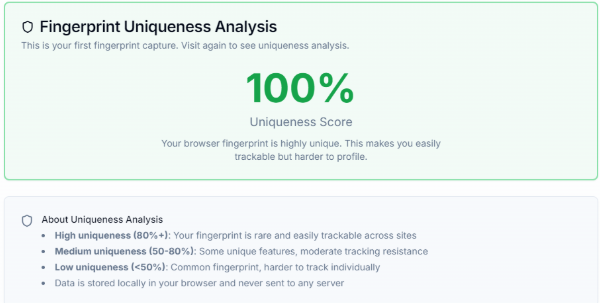
If you’re working in a team, MoreLogin offers unlimited free team member accounts, so the collaboration can be seamless and efficient. Whether you're conducting research or building robust security systems, it can be one of the best AI assistants to protect your accounts with advanced digital fingerprinting technology.
In this post, we explained how CreepJS works as a browser fingerprint analysis tool and why it has become an important reference for evaluating online privacy and detection risks. It walks through the core mechanics of browser fingerprinting and common reasons browsers fail CreepJS tests, such as mismatched parameters, reused fingerprint templates, and inconsistencies between browser-level and system-level data. More importantly, using tools like MoreLogin allows users to test, compare, and refine fingerprints in a controlled way, making long-term account operations more stable and efficient.

 EN
EN